In this article, we will learn how to write test data builders that remove duplication in constructing objects and increase the expressiveness of the test code. We will also learn how to use Lombok to reduce boilerplate code around the builders.
In a previous article, we talked about how to remove duplication while at the same time making the code more descriptive. This article is a more practical guide concentrating on the test data builder pattern.
🧰 Constructing Complex Test Data
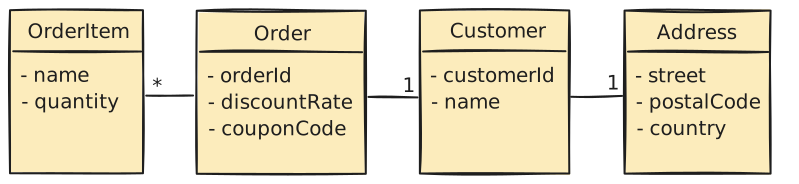
Let’s imagine we have an Order class with a Customer and a customer has an Address. Also, an Order has one or more OrderItems. Furthermore, the Order might involve a discountRate or some couponCode.
Orders, order items, customers and addresses
We might want to test a lot of business logic around these objects:
Check that we cannot apply a discount rate and coupon code at the same time
Check that the quantity of items does not exceed the inventory balance
Check that we apply different shipping rate on a foreign address
For different use cases, we have to create objects in different state. In our production code, we create things in relatively few places. However, in tests, we have to provide all the constructor arguments every time creating an object.
In this example, we use constructors and immutable objects, so they do not have setter methods. The test code becomes quite hard to read.
@TestvoidconstructOrderWithForeignAddress(){Addressaddress=newAddress("1216 Clinton Street","Philadelphia","19108","United States");Customercustomer=newCustomer(1L,"Terry Tew",address);Orderorder=newOrder(1L,customer,0.0,null);order.addOrderItem(newOrderItem("Coffee mug",1));// ...}
The code is full of details that are irrelevant to the behavior that we test. The result is very noisy. Also, tests become brittle because adding any new parameters will break a lot of tests.
👵 Reduce Duplication With the Object Mother Pattern
The object mother pattern is an attempt to avoid the before-mentioned problems. An object mother is a class with factory methods for different use cases in tests.
Let’s take a look at a couple of object mothers.
publicclassOrders{publicstaticOrdercreateOrderWithCustomer(Customercustomer){returnnewOrder(1L,customer,0.0,null);}}publicclassCustomers{publicstaticCustomercreateCustomerWithAddress(Addressaddress){returnnewCustomer(1L,"Unimportant",address);}}publicclassAddresses{publicstaticAddresscreateAddressWithCountry(Stringcountry){returnnewAddress("Some street","Some city","Some postal code",country);}}// ...
Now we call our factory methods from the test code.
The object mother pattern makes tests more readable and hides code that creates new objects. We can provide safe values for fields without having to pollute the test code with those values. It also helps with maintenance because we can reuse the code between tests.
However, the object mother pattern is not flexible when test data varies. Every small change in test data requires a new factory method. Having to change the object mother for a lot of different reasons violates the Single Responsibility Principle.
🏗️ Make Construction Easier With the Builder Pattern
The Builder pattern is a design pattern designed to provide a flexible solution to various object creation problems in object-oriented programming. The Builder design pattern intends to separate the construction of a complex object from its representation.
For classes that require complex setup we can create a test data builder. The builder has a field for each constructor parameter.
We provide the actual values using public “with” methods which can be chained.
@TestvoidconstructOrderWithForeignAddress(){Orderorder=newOrderBuilder().withId(1L).withCustomer(newCustomerBuilder().withCustomerId(1L).withName("Terry Tew").withAddress(newAddressBuilder().withStreet("1216 Clinton Street").withCity("Philadelphia").withPostalCode("19108").withCountry("United States").build()).build()).withOrderItem(newOrderItemBuilder().withName("Coffee mug").withQuantity(1).build()).build();}
The example doesn’t provide any advantage over the object mother yet. Next, let’s look at how we can improve the situation.
🙈 Set Safe Default Values to Hide Details
If our classes expect some values to exist, our test code has to provide these values. However, a lot of times, these values might not be relevant to the test case. We want to hide the details that are irrelevant to the test.
Let’s change the way we build the dependent objects.
publicclassOrderBuilder{privateLongorderId=1L;privateCustomercustomer=newCustomerBuilder().build();privateList<OrderItem>orderItems=newArrayList<>();privateDoublediscountRate=0.0;privateStringcouponCode;// ...}publicclassAddressBuilder{privateStringstreet="Some street";privateStringcity="Some city";privateStringpostalCode="Some postal code";privateStringcountry="Some country";// ...}
By setting a default value to the customerBuilder field and any other fields, we provide safe values for these fields. This way, we can omit any fields that are not relevant to our test but require a value.
Now the test data builder can hide details like the object mother pattern does. However, the builder is more flexible than the object mother.
➡️ Simplify Code by Passing Builders as Arguments
In our builder example, the builder consumes some arguments that are objects built by other builders. If we pass those builders as arguments instead of the constructed objects, we can simplify the code by removing the calls to build() methods.
There is still some noise in the tests because we have to construct various builders. We can reduce this noise by adding factory methods for the builders.
We are still duplicating the name of the constructed type in both the “with” methods and the builder names. We can take advantage of the type system and shorten the names of the “with” methods.
The factory methods hide a lot of details about the builders. The code is now more descriptive as it speaks in domain terms.
♊ Reduce Code When Creating Similar Objects
If we need to create similar objects, we could use different builders for them. However, different builders lead to duplication and make it harder to spot differences.
Because of the repetition in the construction, the difference with the discount rate gets hidden in the noise. We can extract a builder with a joint state and then provide the differing values for each object separately.
We would expect that only the first order has the discount rate applied. However, since calling the builder methods affects the builder’s state, the second order will have a discount rate applied as well!
One way to solve this is to add a method that returns a copy of the builder.
There is still room for human error, so if we want to be safe, we could make the “with” methods always return a copy of the builder.
🌶️ Reduce Boilerplate With Lombok
While the test data builder pattern provides a lot of benefits, there is also one major drawback. That is, we end up writing a lot of boilerplate code.
To tackle this problem with boilerplate, we can take advantage of the Lombok project. We can get rid of the default constructor, getters and automatically create a builder class by annotating the class with Lombok @Data and @Builder annotations.
Unfortunately, for collections, you now have to pass a collection as the builder argument. Luckily, by annotating a collection field with @Singular, Lombok will generate methods for single items in the collection.
There is still one problem, though. This code now suffers from the same problem as our custom builder when we try to vary our data. In our custom builder, we added a but() method to deal with this.
Luckily, Lombok allows us to configure a toBuilder() method.
Now Lombok builder is pretty close to the expressiveness of our custom builder.
The obvious benefit of using Lombok is that we get rid of a lot of boilerplate code. However, our code is also a little noisier because we have to write, e.g.:
There is one more issue, though. There are no safe default values for our fields. We could add default values in our production code, but it’s not a good idea to do that only for tests.
💞 Combine Builders and Object Mothers
To deal with the problem of not having safe default values, we can take the idea of the object mother pattern and use that together with our Lombok-generated builders.
Instead of using the Lombok-generated factory method, we can use the factory method from the object mother. The only thing we have to do is to change the static imports. Basically we are calling Orders.anOrder() instead of Order.anOrder(), for example.
Since we cannot pass around builders as arguments, the code is still a little noisier than our custom builder. Another drawback is that our builder will now always unnecessarily construct defaults for objects whose value we override in our tests.
✅ Summary
Test data builders offer several benefits over constructing objects by hand. They help to hide syntax noise related to creating objects. They make the simple cases simple, and special cases are not much more complicated. Test data builders also make the code easier to read and are resilient to changes in the object structure.
We can also take advantage of the Lombok builders combined with the object mother pattern. While we lose a bit in the compactness, we reduce a lot of the boilerplate code.
You can find the example code for this article on Codeberg.
Thanks for sharing great article :) I discover your blog. So I’ve question about lombok. If I consider Order and OrderItem like entities. we have bidirectional oneToMany. In that case we need to add some additional methods like addItems to link Order and OrderItem. it looks like this
if you use @Builder, lombok generate something like this on method build : orderItems = Collections.unmodifiableList(new ArrayList(this.orderItems)); we noticed we don`t have item.setItem(this);. So if you save Order, in OrderItem table we see order is not linked.
So in that case how we can combine a Builder and Object mother to replace those additional methods ?
Thanks again your blog is just wealth of information :)
As far as I know there is no way to handle the bidirectional relationship via Lombok builders. Of course, while not ideal, you can always add those methods manually.
Just a word of warning though, make sure Lombok doesn’t generate equals() or hashCode() methods for your JPA entities as it will cause problems. Also toString() could be problematic.
/**
* The field annotated with {@code @Default} must have an initializing expression; that expression is
* taken as the default to be used if not explicitly set during building.
*/@Target(FIELD)@Retention(SOURCE)public@interfaceDefault{}
They do, but the problem is that it will become a default value for the production code. If that is ok with you, you could use that, but I’ve found more often than not that you need different defaults for your test data builders or object mothers.
Maybe there is some misunderstanding from my part, but the Lombok @Builder annotation is added to the actual entity we want to create. I’m not aware of a way to put that annotation on a separate class that would then create that entity. Thus, it’s not in the test source set.
In my example, only the hand-made builders are under test sources.
I’m not sure how that helps because it would just make Order insccessible in production code. And if you make a duplicate in the test sources, then the builder is not creating an object of the same type anymore.
It works ok when you would use the builder pattern in your production code as well, but it does have drawbacks like also mentioned in the article. I personally go with the custom classes and don’t mind the boilerplate.
This article has been written in February 2021 with no major changes since. From what I can tell your article has been published one and a half year after that.
Thanks for sharing great article :) I discover your blog.
So I’ve question about lombok. If I consider Order and OrderItem like entities. we have bidirectional oneToMany. In that case we need to add some additional methods like addItems to link Order and OrderItem. it looks like this
if you use @Builder, lombok generate something like this on method build :
orderItems = Collections.unmodifiableList(new ArrayList(this.orderItems));we noticed we don`t have item.setItem(this);. So if you save Order, in OrderItem table we see order is not linked.So in that case how we can combine a Builder and Object mother to replace those additional methods ?
Thanks again
your blog is just wealth of information :)